for Business
Product Projects and tasksBoard, table, list, timeline and calendar Team chatChannels and direct messages ClientsWhat each one is billed and owes Invoicing and bookkeepingQuotes, invoices, expenses, profit and loss SaousAn assistant that reads your records
Why Deklik Compare the costThe apps you pay for, against one plan Security and dataWho can see what, and what we never do Move in from your toolsClickUp, monday.com, Asana, QuickBooks and more
Pricing
Resources Questions Write to us Deklik for your own life Privacy policy
Sign in Start free trial
Five people for $19 a month

Projects, team chat and bookkeeping for small businesses.

Deklik for Business takes the place of the project tool, the chat app, the invoicing app and the accounting software a small team pays for one by one.

No card to start. On the web, iPhone, iPad and Android.

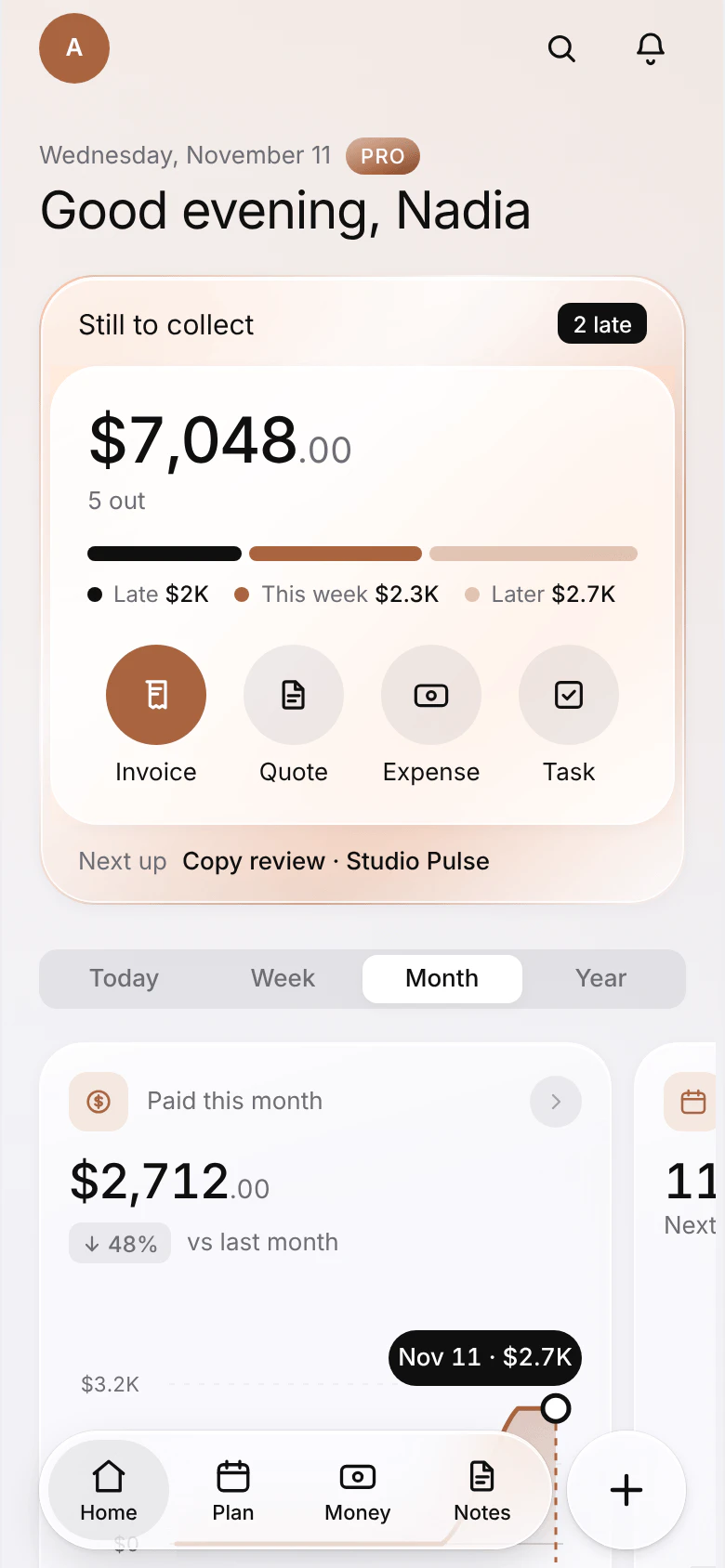
Deklik for Business on its Home page: what clients owe, what was paid this month, today's bookings, open quotes and the invoices that need a reminder.
  • Five people, $19 a monthThen $4 a month for each person after.
  • 14 days freeWith your whole team, and no card asked for.
  • Web, iPhone, iPad, AndroidOne account, the same workspace on each.
  • Bring what you haveFrom ClickUp, Asana, monday.com, QuickBooks and more.

One workspace instead of five apps.

The work, the conversations and the money sit side by side, so nothing is copied from one app into another.

The whole team, one price

Five people are in the plan, and each one after is $4 a month. Everyone sees the work they need, and nothing more.
Boards, tables and timelines

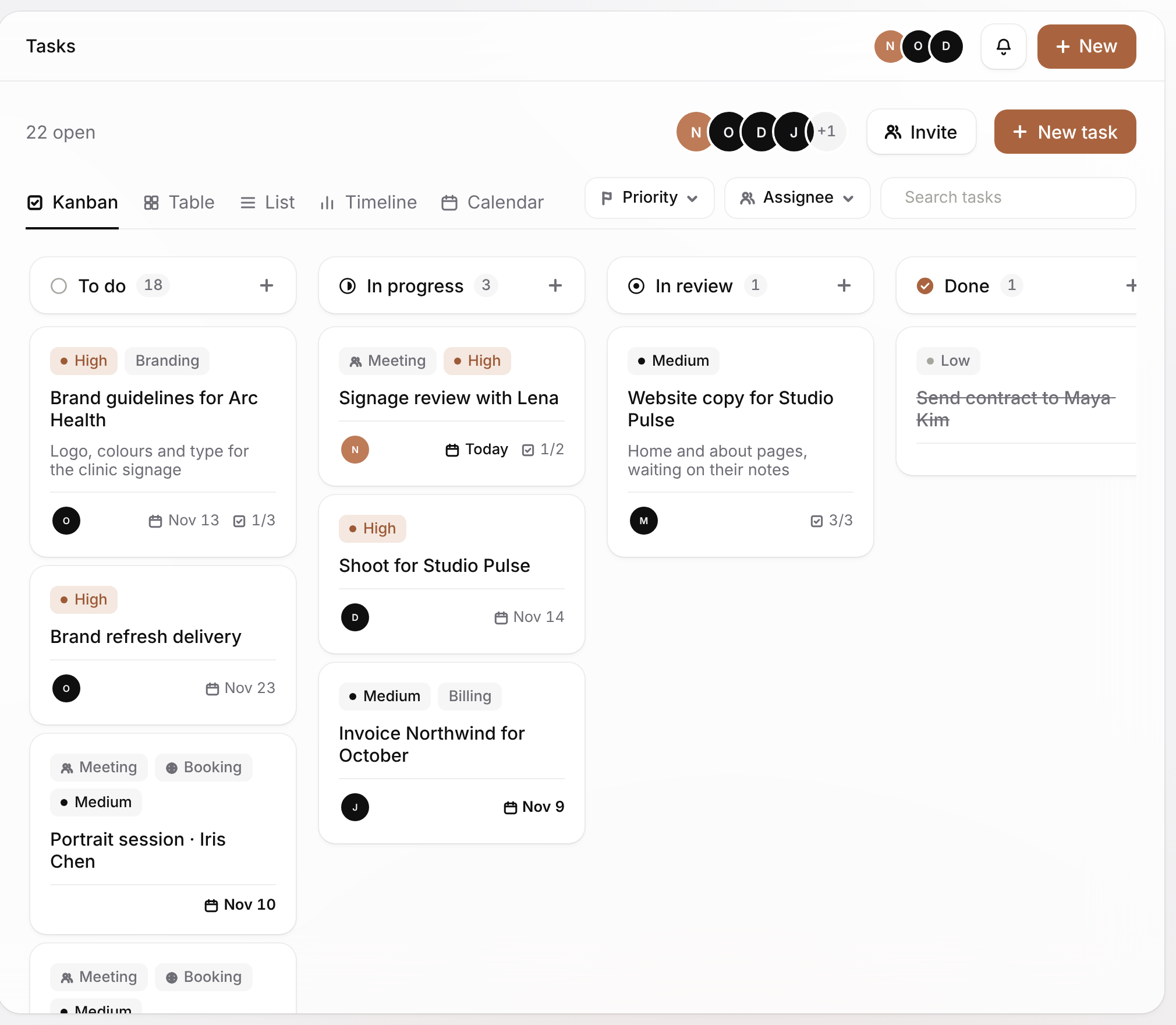
The same tasks five ways: board, table, list, timeline and calendar.

Chat that knows the work

Mention a task, a client or an invoice, and it opens from the message.

What you are owed, at a glance

Every invoice with its client, what is paid and what is late, and the reminder one click away.

Your projects, your team and your clients in the same workspace.

A task can name its client, a message can carry the invoice it is about, and Saous can answer from all of it. Pick a part to see it up close.

Projects and tasks

Each job is a project, and each piece of it a task with an owner, a due date and a priority. Look at the same tasks as a board, a table, a list, a timeline or a calendar.
  • Five views of the same tasks
  • Templates for the work you repeat
  • Meetings with their place or video link
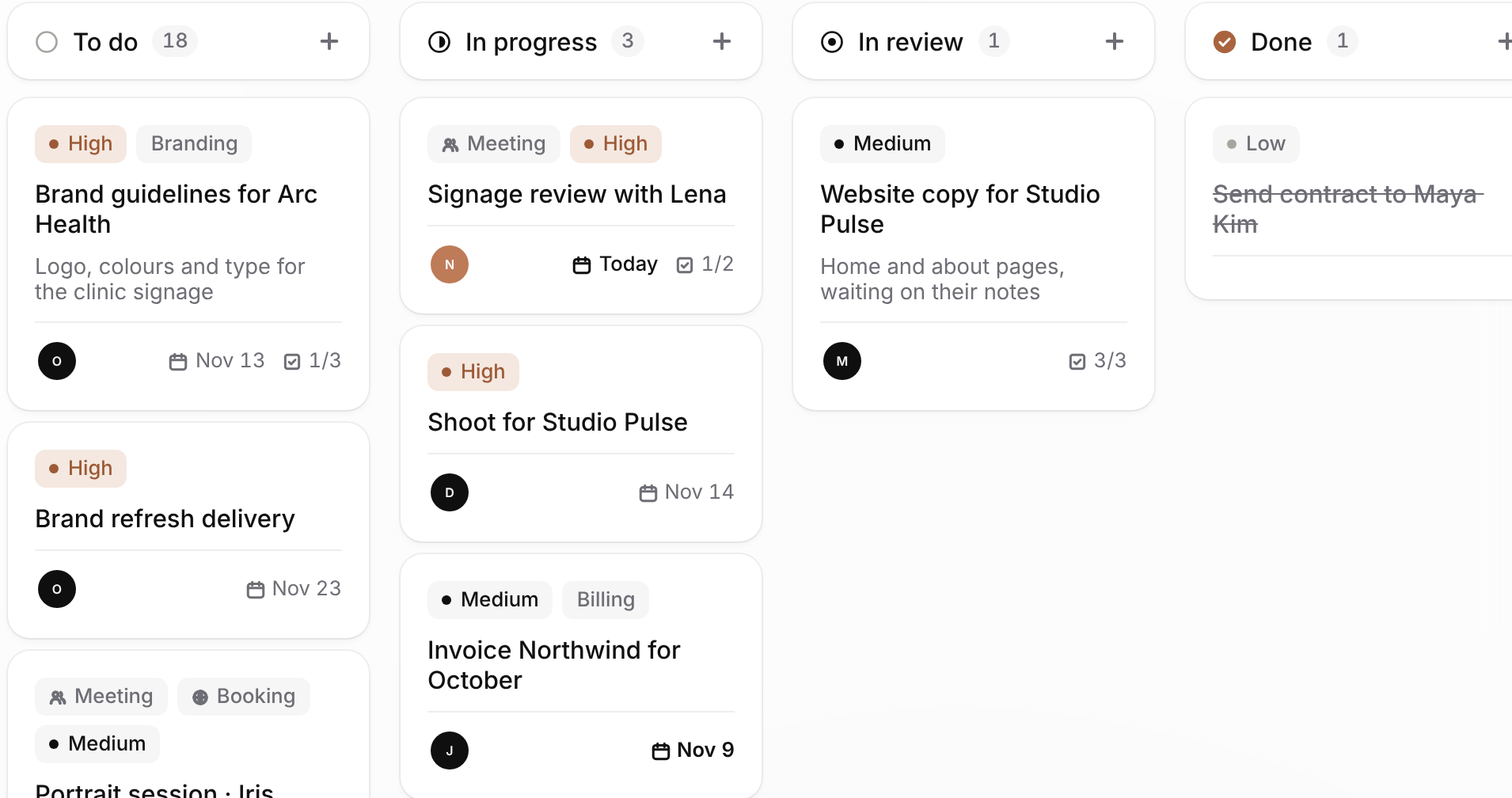
The Tasks board: To do, In progress, In review and Done, each card with its priority, its owner, its due date and its checklist.

Team chat

Channels for each part of the business and direct messages between people. Mention a task, a client or an invoice and it opens from the message.
  • Channels and direct messages
  • Invoices and tasks shown in the conversation
  • On every phone, with the rest of the app
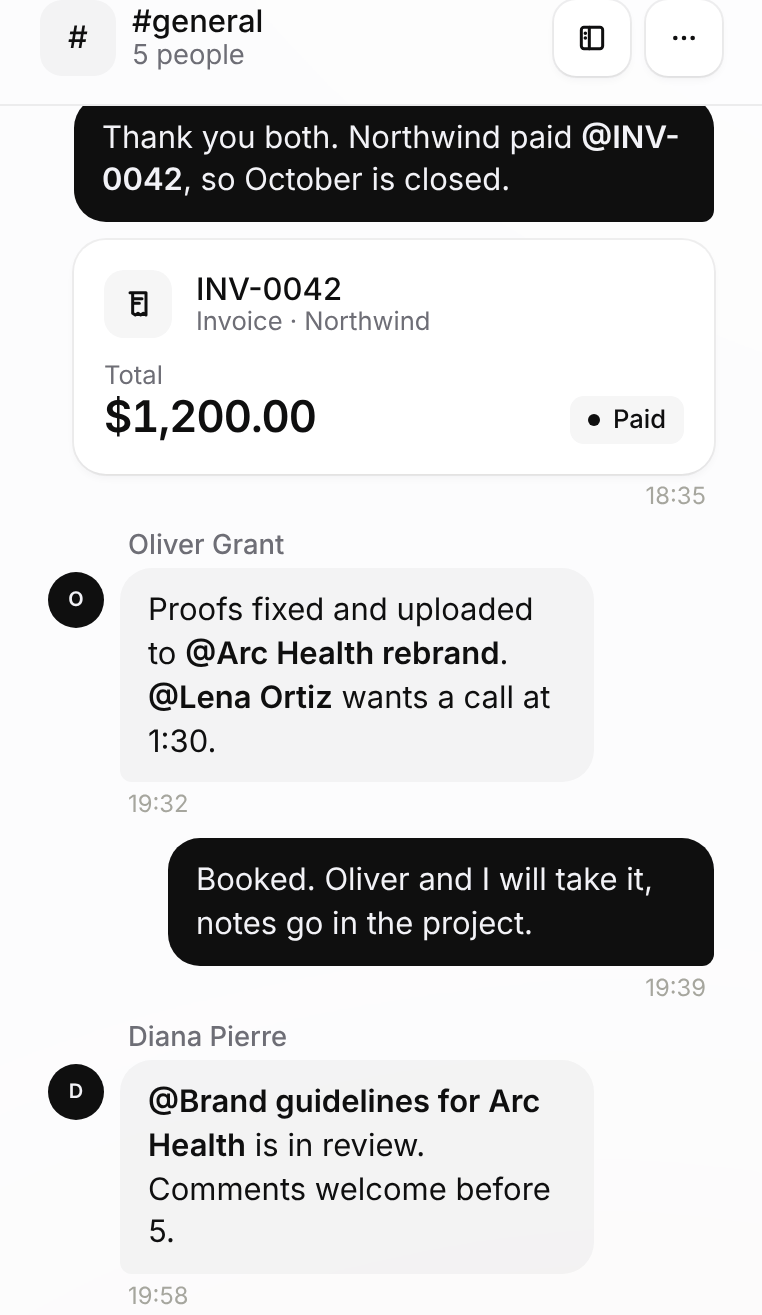
Team chat in the general channel: a paid Northwind invoice for $1,200 shown in the conversation, and teammates mentioning a project, a client and a document in review.

Clients

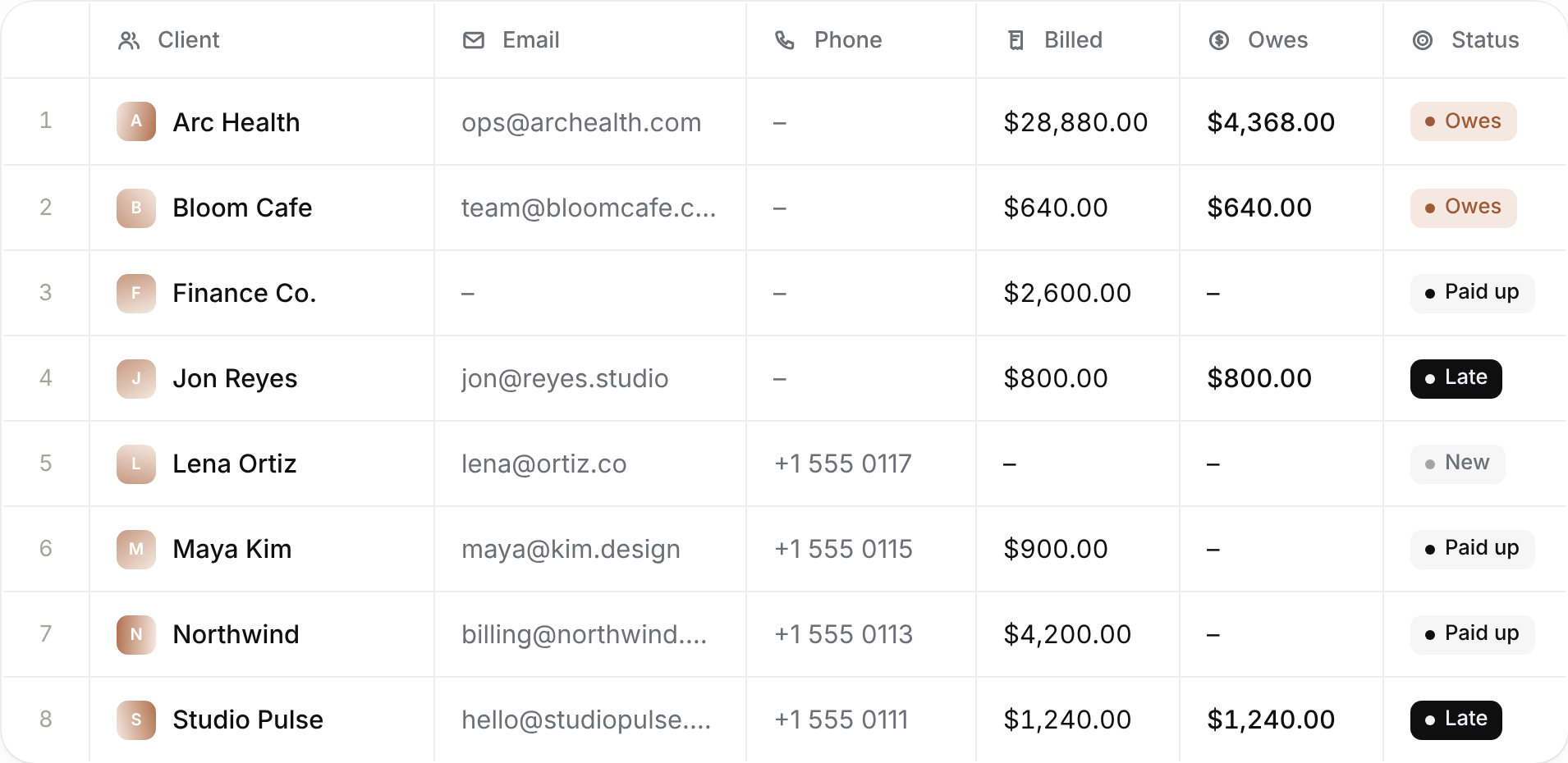
Every client with what you have billed them, what they still owe and whether it is late. Their logo is found from their website, and they can book time with you from your own booking page.
  • Billed, owed and late at a glance
  • A pipeline from first call to signed
  • A booking page clients book you from
The Clients table: each client with their email, phone, the amount billed, the amount owed and a status of Owes, Paid up, Late or New.

Saous, the assistant

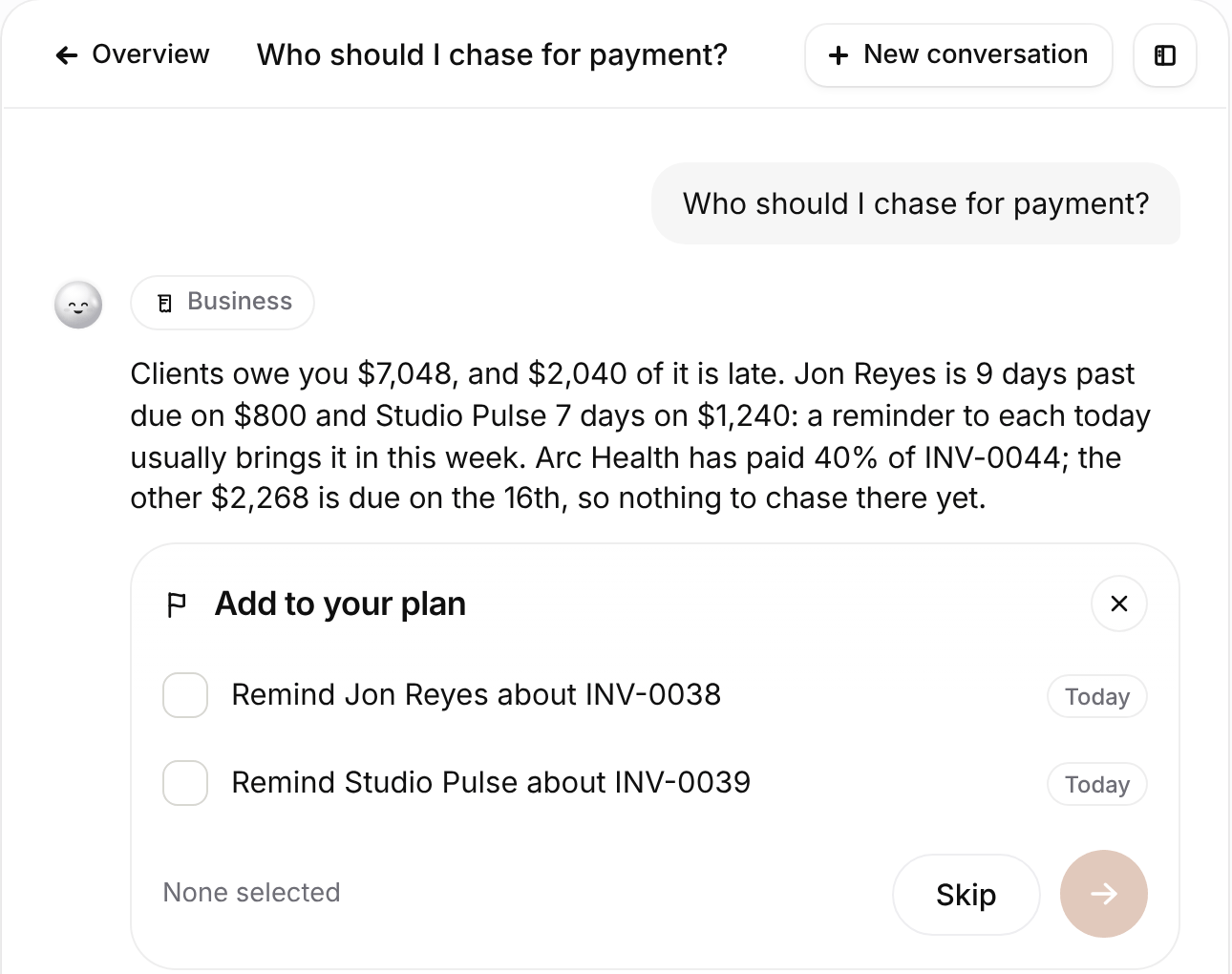
Saous reads your business records. Ask who to chase for payment or how the month is going, and it answers with the figures, then offers the next steps as tasks.
  • 100 questions a month in the plan
  • Off until you turn it on
  • What you ask is not used to train AI models
Saous answering “Who should I chase for payment?”: $7,048 owed, $2,040 of it late, and two reminders offered as tasks for today.

Roles and access

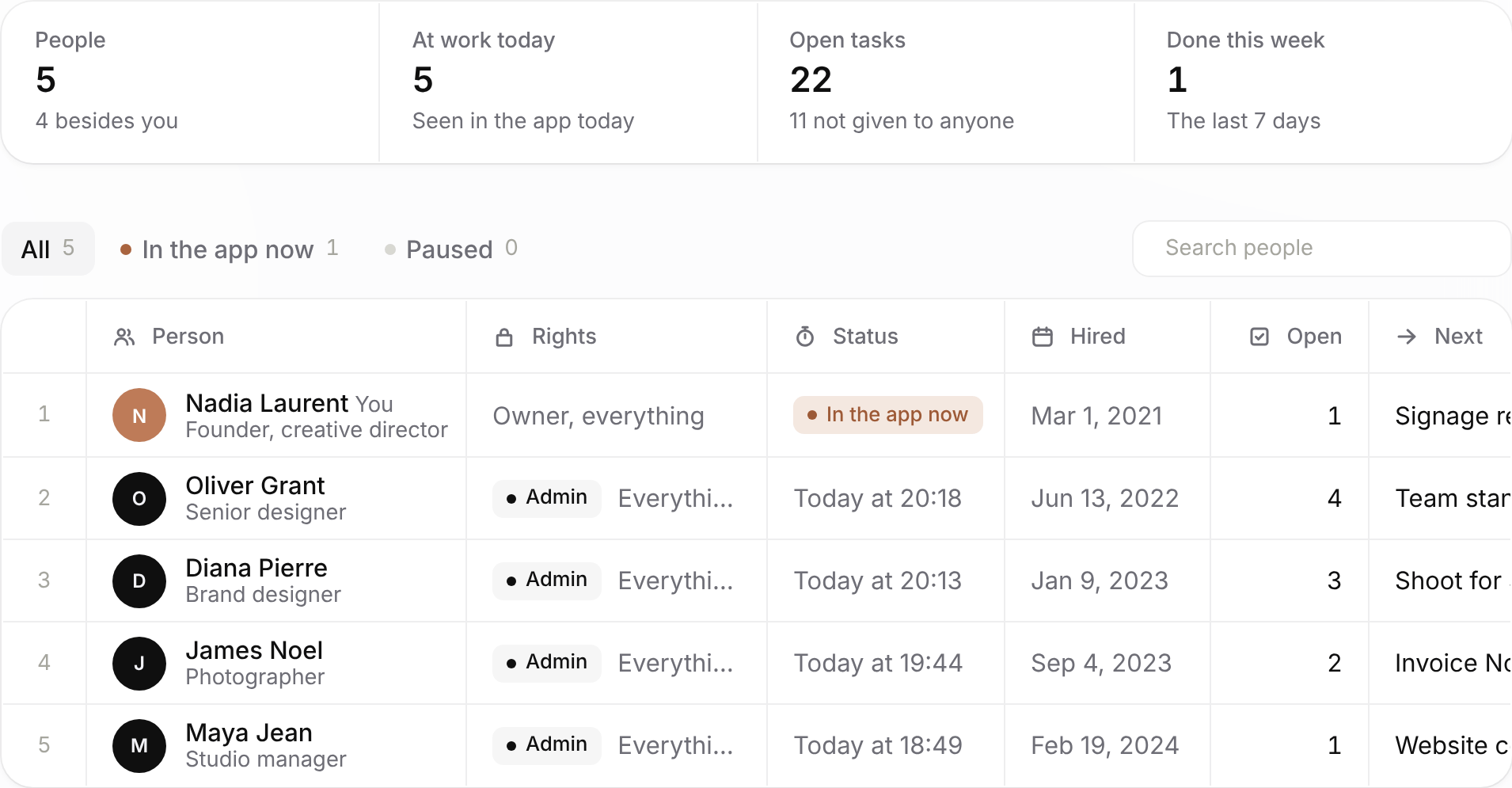
Give each person a role (admin, member, accountant or viewer) or choose what they can open, area by area. The rules are checked by our database, so a page someone cannot see is also a page they cannot reach.
  • Four roles, or your own mix
  • Who is in the app today, and what is next for each
  • Checked on the server, not only in the app
The Team page: five people with their rights, who is in the app now, when each was hired and how many tasks each has open.

Invoicing and bookkeeping come with it.

Project tools stop at the work. Deklik for Business also sends the quote, collects the payment and keeps the books, so there is no QuickBooks, FreshBooks or separate invoicing app to pay for.

Quotes and invoices

Your client signs the quote online and it becomes the invoice they pay by card, straight to your own Stripe. Reminders go out on the days you choose.

Bookkeeping

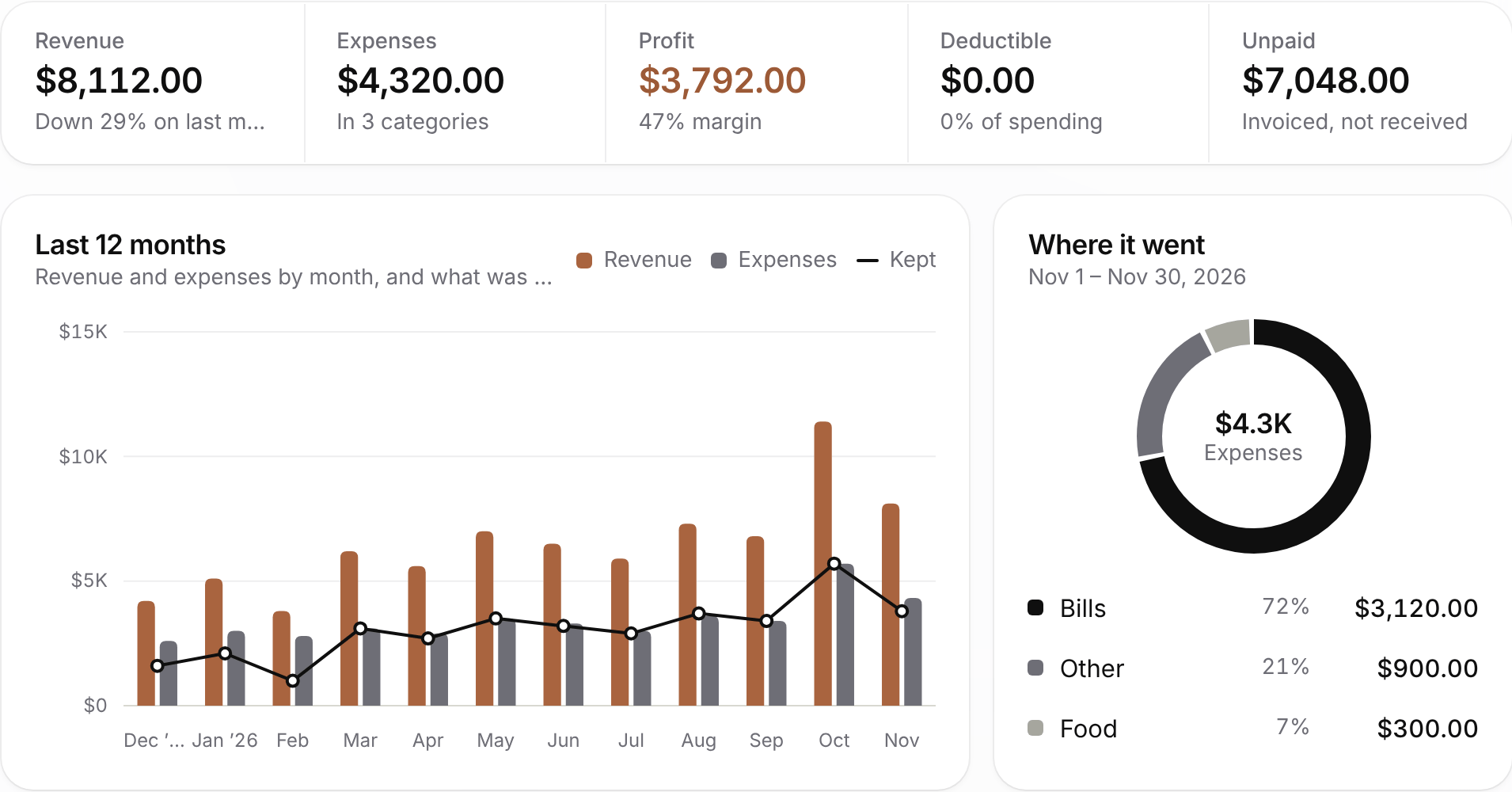
Income is recorded when a client pays, receipts and bills are read for you, and the profit and loss is up to date every day of the month.
See what it replaces
Profit and loss for November 2026: $8,112 of revenue, $4,320 of expenses and $3,792 of profit, with twelve months of revenue and expenses and where the money went.
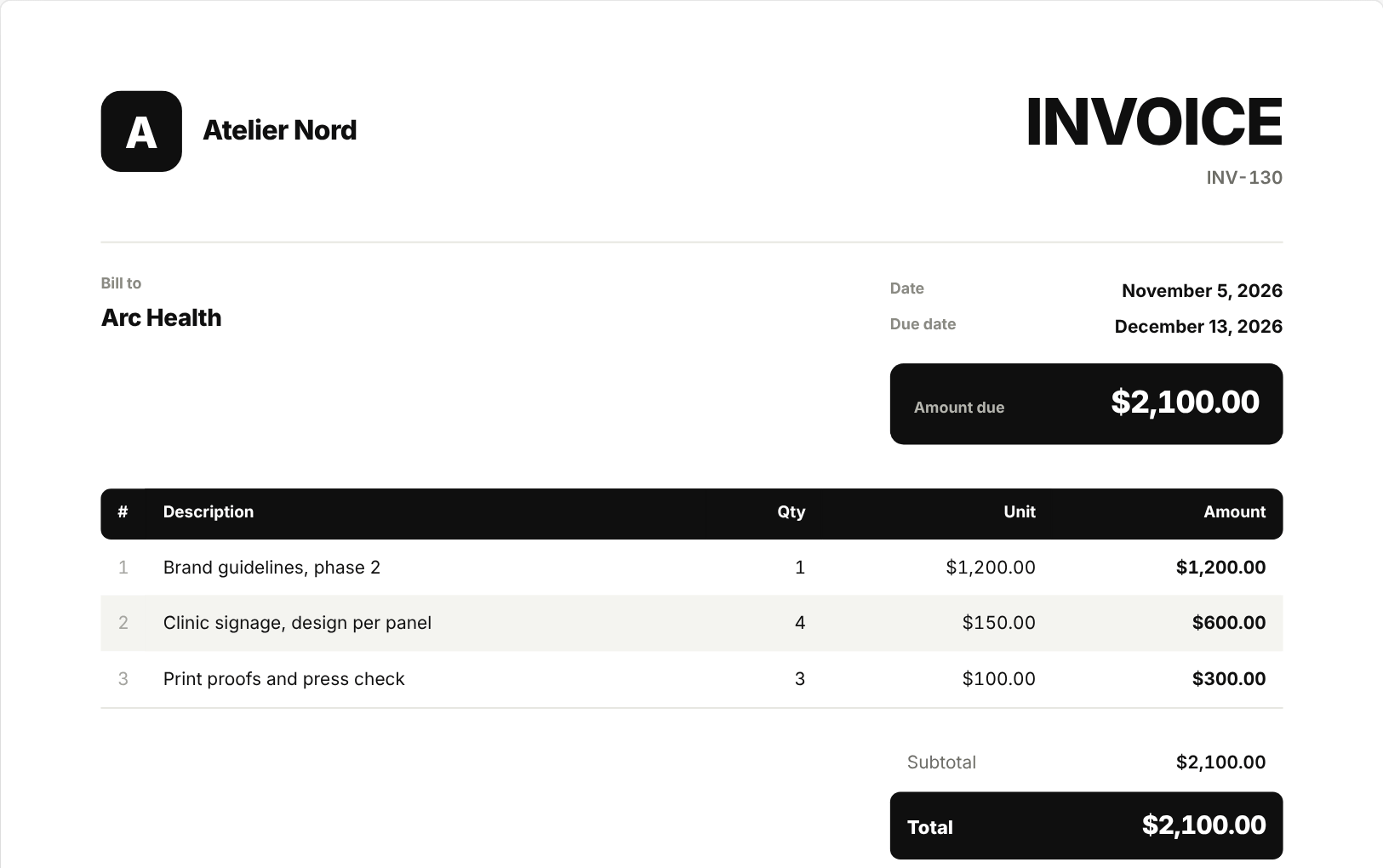
An invoice from Atelier Nord to Arc Health: three lines of design work, $2,100.00 due on December 13, 2026.
0.5% on card payments

Taken only when a client pays an invoice by card, on top of Stripe's own fee. Deklik never holds the money.

200 receipts a month

Photos of receipts and PDFs of bills are read by AI and filed under the right category.

Ready for your accountant

The transactions export to a spreadsheet whenever your accountant asks for them.

From sign-up to the first paid invoice.

No set-up call and no card: the 14 days start the moment the business exists.

Step 1

Create the business

Its name, its currency and its logo. Everything in the plan is open from the first minute.

Step 2

Bring the team and the work

Invite your people by email, and import projects from ClickUp or Asana and invoices from QuickBooks.

Step 3

Send the first invoice

Your client pays it by card through your own Stripe, and it is in the books the moment they do.

What you pay now, and what you would pay with Deklik.

Set the size of your team and tick the apps it pays for today. Each price is the company's own public monthly list price.

10
The apps a team pays for, their price for your team each month, and what Deklik for Business includes
What you needWhat you use nowTheir priceYour team, a monthDeklik for Business
Team chat $8.75 a person $87.50 Included
Projects and tasks $13.49 a person $134.90 Included
Docs and notes $12 a person $120 Included
Bookkeeping $38 for the company $38 Included
Invoicing $23 for the company $23 Included
Your team, a month$260.40$39
$2,657

less a year, with all 10 people on one plan.

Also in the plan, and not counted here: the booking page clients book you from, quotes signed online, receipts and bills read by AI, Saous, and roles for each person.

Public list prices in US dollars, billed monthly, November 2026: Slack Pro $8.75 a person, Asana Starter $13.49 a person, monday.com Basic $12 a seat with 3 seats at least, ClickUp Unlimited $10 a person, Notion Plus $12 a person, QuickBooks Online Simple Start $38 and FreshBooks Lite $23 for the company. Deklik for Business: $19 for five people, $4 for each one after.

Your data, and who can see it.

What happens to the work your team puts in Deklik, in plain words. The privacy policy has all of it.

Read the privacy policyHow to delete an account

  • Access checked by the database

    Every table has row-level security: the server returns only the records the signed-in person may see, and team roles are enforced there too.

  • Encrypted on the way and at rest

    Everything travels over HTTPS, and the database and your files are encrypted where they are stored.

  • No ads, no trackers

    The app has no advertising and no third-party tracking, analytics or ad software of any kind.

  • Not sold, not used for training

    We do not sell or rent your information, we do not build a profile of you, and we do not use what you write to train anything.

  • AI only when you use it

    Saous and receipt reading send only what they need to Anthropic, the maker of Claude, whose terms do not allow it to train on them.

  • Card details stay with Stripe

    Your clients pay on Stripe's own page. Their card numbers never reach us, and the money goes to your own Stripe account.

  • Private files

    A file on a project opens only for the people on it, each time through a link that expires after ten minutes.

  • Yours to take, or to delete

    Ask for a copy of everything on your account, or delete the account from Settings, which erases your records from our servers.

On the computer, the iPad and every phone.

Open business.deklik.app in any browser, and the Deklik app on iPhone, iPad and Android. The apps keep working without a signal and catch up when they are back online.
  • On a computerbusiness.deklik.app, in any browser
  • iPhone and iPadWith Apple Pencil for notes
  • AndroidPhones and tablets
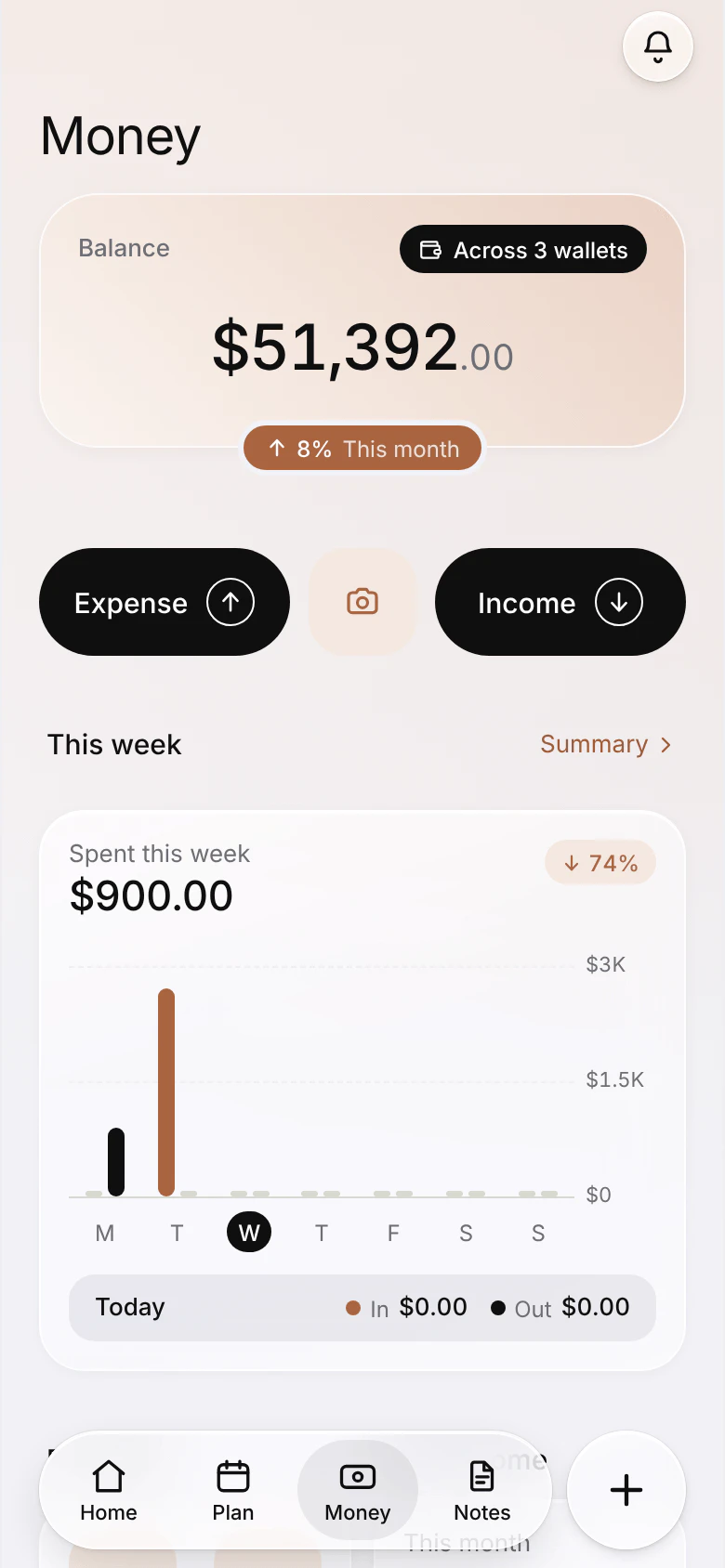
The Money page of Deklik for Business on an iPhone.
The business Home on an iPhone.
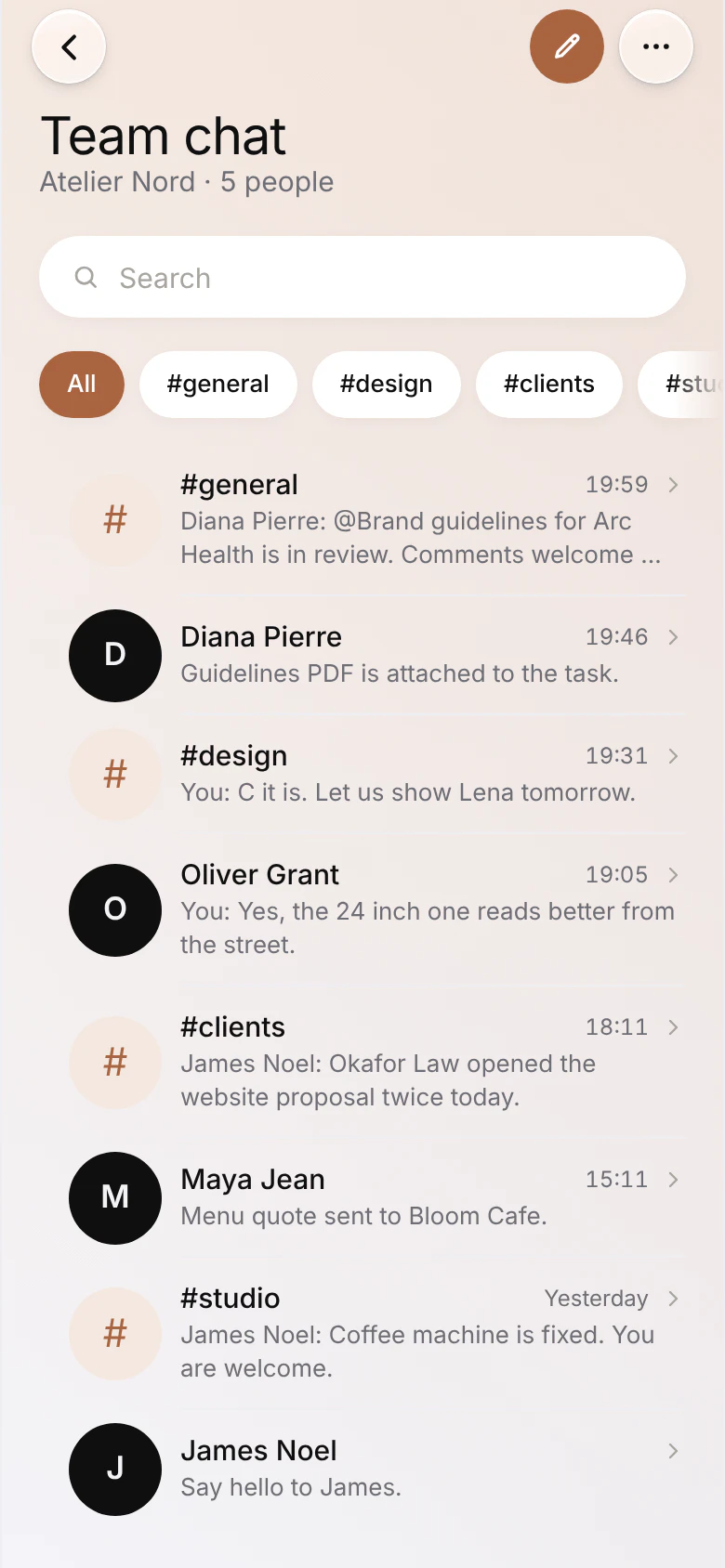
Team chat on an iPhone.

Bring your projects and your books with you.

Export from the app you use now and drop the file in Deklik. You see a preview before anything is added, and a spreadsheet works too.

The work

The money

Team chat starts fresh, with a channel for each part of the business.

Moving from ClickUp

    One plan for the whole business.

    Everything on this page is in it. Try it free for 14 days with your team, then pay by the month or by the year.

    Deklik for Business

    $19a month

    Five people included. $4 a month for each person after.

    5
    The plan, five people$19
    No one more$0
    Your team, a month$19
    Start your 14 days free

    No card to start. Cancel any time.

    In the plan

    • Projects and tasks, no limit
    • Board, table, list, timeline, calendar
    • Team chat, channels and direct messages
    • Roles and access for each person
    • Clients and a pipeline
    • Quotes signed online
    • Invoices paid online by card
    • Bookkeeping, profit and loss, taxes
    • Receipts and bills read by AI
    • A booking page clients book from
    • Notes with Apple Pencil
    • Saous, the assistant
    • Dashboards and templates
    • Your colour, your corners
    The only other costs: Stripe's fee and 0.5% to Deklik when a client pays an invoice online. Plans are paid in the Deklik app on iPhone or Android, through the App Store or Google Play, and follow your account everywhere.

    Questions before you switch.

    How does the free trial work?
    Create your business account and the 14 days start, with everything in the plan and room for your whole team. No card is asked for. When they end, your work stays and can still be opened; to keep adding to it, subscribe. Nothing is ever deleted.
    Who counts as a person?
    Anyone in your team: you, and everyone you invite. Five people are in the plan. Each person after five is $4 a month, and you can add or remove people whenever the team changes.
    Can we move over from Slack, Asana, monday.com or ClickUp?
    Yes. Bring tasks and projects from ClickUp, monday.com, Asana, Trello, Notion, Todoist, Jira or a spreadsheet, and invoices, bills and expenses from QuickBooks, Xero, Wave, FreshBooks or Zoho. Your team chat starts fresh in Deklik, with channels for each part of the business.
    Do I still need QuickBooks?
    For most small businesses, no: quotes, invoices, payments online, expenses and bills, receipts read by AI and profit and loss are all in the plan, so there is no QuickBooks, invoicing app or booking app to pay for beside it. If you run payroll, or your accountant keeps full double-entry books, you may still want accounting software for that, and Deklik exports your transactions to a spreadsheet for it.
    Where do I pay?
    In the Deklik app on iPhone or Android, through the App Store or Google Play. The plan belongs to your account, so it works the same on business.deklik.app, the iPad and every phone you sign in on.
    Can I cancel?
    Any time, in your App Store or Google Play subscriptions. The plan runs to the end of what you paid for. After that your work is kept, and opens again exactly as it was the day you subscribe again.
    What does Deklik take when a client pays online?
    0.5% of the payment, on top of Stripe's own fee. The money goes from your client straight to your own Stripe account: Deklik never holds it.
    Is our data private?
    Yes. There are no ads and no third-party tracking in the app. We do not sell your information and we do not use your work to train anything. Saous is the one exception, and only when you turn it on: it sends a summary of your records and your question to Anthropic, which answers and may not train its models on any of it.
    Does it work on our phones and iPads?
    Yes. The same workspace runs on business.deklik.app in any browser on a computer, and in the Deklik app on iPhone, iPad and Android. The apps keep working without a signal and catch up when they are back online.

    Try it with your team for 14 days.

    Create the business, invite your people and bring over your projects and invoices. No card is needed to start, and nothing is deleted if you stop.

    On a phone, start in the Deklik app and choose Deklik for Business.